Content Variations in CMS 13, Part 3: Audiences vs Audiences - Same Word, Two Engines
Executive summary. Part 2 left the experiment running against Everyone. Real projects don’t look like that. So this part wires the same CMS Content Variations to two different audience engines and measures what each one actually does. Every number below comes from a live CMS 13.1.0 + FX SDK instance. A targeted delivery served
variant_ato 60 of 60 mobile visitors; at 100% allocation that is deterministic, so a single miss would be a bug rather than noise. The desktop experiment held its 33/33/34 split (χ² = 1.465, n = 300). The MVC head and the headless Next.js head agreed on the arm and the rule for 20 of 20 visitor/device pairs, with zero coordination code. The same runs found the boundary. CMS Audiences evaluate only inside the CMS runtime: a personalized block vanished from Optimizely Graph entirely, invisible to every headless consumer, and nothing threw an error. If your requirement says “both heads”, the audience decision is made before anyone asks about features.
Parts 1 and 2 built the machine: Content Variations as the quiet hero of CMS 13, then Feature Experimentation as its stats engine, with one string, VariationKey == variation name, as the entire integration contract. This part answers the question that contract postpones: who decides who the visitor is? CMS 13 has an answer. FX has a different answer. Both are called Audiences now, and they are not the same thing. Everything below ran on CMS 13.1.0 with the C# SDK 4.3.0 and the JavaScript SDK 6.4.0. Every number is from those runs.
In this part: the Audiences naming collision · the three-layer opt-in (and the startup self-check it forced) · the five-attribute pipeline with native geolocation · targeted delivery semantics the docs bury · the coexistence proof and the Graph void · the day the headless head went dark · three QA override levels · a troubleshooting runbook · eight sharp edges ranked by blood · FAQ · glossary.
The machine at a glance
One picture before the prose. Both heads serve the same experiment from the same definitions. The only shared state is configuration-as-data:
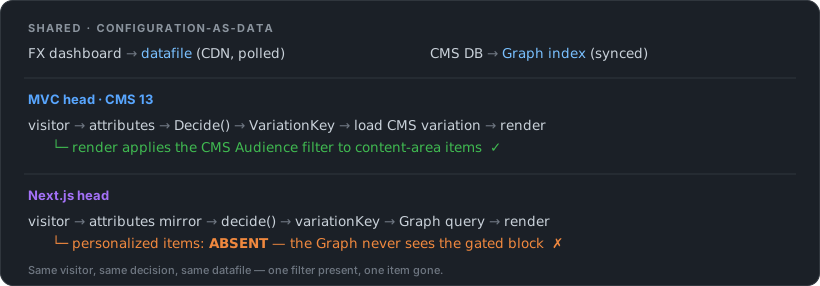 Both heads share configuration-as-data and run the same FX decision; they diverge on the last line of each lane. The MVC render applies the CMS Audience filter to content-area items; on the Next.js / Graph path that personalized item is simply absent.
That bottom line is the whole point: the CMS Audience layer has no representation on the Graph path. The rest of this article is the evidence for every arrow.
Two engines, one word: both of them are called Audiences now
Start with the vocabulary trap, because it will find you anyway. Visitor Groups have been rebranding to Audiences since the CMS 12 admin redesign. CMS 13 finishes the job: the admin package describes itself as the “audiences management UI”, the docs say “an audience (formerly called a visitor group)”, and the old name survives mostly in role names and API types. Feature Experimentation has had Audiences for years. Same word, two engines, and they answer the same question with opposite architectures:
| CMS Audiences (né Visitor Groups) | FX Audiences | |
|---|---|---|
| Evaluated by | The CMS, server-side, during rendering | Every SDK, in-process, at Decide() |
| Evaluation input | IPrincipal + HttpContext - full request, roles, visit history | Only the attributes your code passed at context creation |
| Definition lives in | CMS admin (VisitorGroupAdmins role) | FX dashboard, ships in the datafile |
| Personalizes | A fragment - one content-area item | A page version - via the variation key contract from part 2 |
| Works headless | No, and the docs say so out loud | Yes - the evaluation is a pure function, portable by construction |
| Measurement | “Enable statistics” view counts, with no exposures, no conversions, no significance | The stats engine: exposures, conversions, significance |
The last two rows are the ones that matter. A CMS Audience can reach into everything the CMS knows about the request, and pays for it by existing only where the CMS renders. An FX Audience knows nothing you didn’t tell it, and pays for that with a pipeline you must build. But the function (datafile + attributes) → bool runs identically in C#, in Node, in anything with an SDK. Keep that trade in view. Every decision below falls out of it.
One governance row to add to part 2’s who-does-what table: audience definitions get owners too. CMS Audiences belong to whoever holds VisitorGroupAdmins. FX Audiences belong to the dashboard. Attribute keys, though, are an API contract between the codebase and the dashboard: a developer renames device and the marketer’s audience silently stops matching. Write them down somewhere both sides read.
Switching the engine on: in CMS 13, personalization is opt-in three layers deep
Part 2’s sharp-edges list opened with a package that crashed CMS 13 at startup. This part’s equivalent is gentler and stranger: in CMS 13, Visitor Groups are not in the box you already have. The EPiServer.CMS metapackage ships neither the evaluation core nor the UI. The install docs state the philosophy plainly: “every NuGet package your project references must have its services explicitly registered, or the application fails at startup.”
The documented pair of calls:
services.AddVisitorGroupsMvc().AddVisitorGroupsUI(); // + EPiServer.CMS.UI.VisitorGroups 13.1.0I learned what each one carries the honest way, by registering less than that. AddVisitorGroupsUI() alone boots clean. Then the Audiences screen throws Unable to resolve service for type 'IVisitorGroupCriterionRepository' the moment an editor clicks it: the screen’s own API services, the ones that load criterion lists and persist rules, resolve against registrations the UI package does not carry. A UI that renders is not a UI that saves. Registering the two internal layers that error message points at fixes the admin screen. It also quietly skips the rendering layer, so personalized blocks would render for everyone. That is the worst possible failure mode: a working configuration surface for a filter that doesn’t run. AddVisitorGroupsMvc() wraps all of it: repositories, the built-in criteria, the content-area rendering filter, and the “View as Audience” impersonation service.
Notice what the docs promised and what actually happened. The promise: misregistration fails at startup. The observation: it failed at click time, with a green boot log. So the demo project now resolves the services the Audiences API needs at startup, in Development, and logs every registered criterion, making the documentation’s promise true at exactly the layer where it broke:
VisitorGroups.SelfCheck: Visitor group criteria registered: DeviceCriterion,
DisplayChannelCriterion, DownloadCriterion, ..., TimeOfDayCriterion, ... (22)
Twenty-two criteria, including RoleCriterion and UserProfileCriterion that the docs list doesn’t mention, plus DeviceCriterion, which is ours. The whole class fits on a slide, and it earns the line this demo is built around: one definition of “who you are”, two engines reading it.
[VisitorGroupCriterion(
    Category = "Technical",
    DisplayName = "Device class",
    Description = "Matches the visitor's device class (mobile / tablet / desktop) "
                + "using the same User-Agent heuristic that feeds the FX 'device' attribute.")]
public class DeviceCriterion(IVisitorAttributesProvider attributesProvider)
    : CriterionBase<DeviceCriterionModel>
{
    public override bool IsMatch(IPrincipal principal, HttpContext httpContext)
    {
        // Editors type the value by hand - trim + lowercase forgives "Mobile "
        // (the FX exact matcher would not; see sharp edge #1).
        var expected = Model.Device?.Trim().ToLowerInvariant();
        return !string.IsNullOrEmpty(expected)
               && attributesProvider.GetAttributes().TryGetValue("device", out var device)
               && Equals(device, expected);
    }
}
Constructor injection works (the built-in geographic criteria take IClientGeolocationResolver the same way), [VisitorGroupCriterion] registers the class through plugin scanning, and the model is CriterionModelBase with one string property and a Copy() => ShallowCopy(). The built-in OSBrowserCriterion could classify devices without custom code. Ours exists for consistency with the FX attribute, not for extra capability.
Reference card: the CMS 13 personalization bill of materials
| Call | Package | What it actually registers |
|---|---|---|
AddVisitorGroupsMvc() | EPiServer.Cms.AspNetCore.Mvc (already referenced) | The whole working engine: repositories and statistics, role infrastructure, the built-in criteria, the content-area rendering filter, fragment handlers, View-as-Audience impersonation |
AddVisitorGroupsUI() | EPiServer.CMS.UI.VisitorGroups (add it; not in the metapackage) | The Audiences management screen (protected module VisitorGroups.zip) and its API controllers |
AddCmsClientGeolocation(o => o.LocationHeader = …) | EPiServer.Geolocation (already referenced) | Header-based geolocation: feeds the geographic criteria and anything else consuming IClientGeolocationResolver |
[VisitorGroupCriterion] on your class | your project | Custom criteria via plugin scanning; explicit AddVisitorGroupsCriterion<T>() only if you disable scanning |
And the criteria catalog as measured on 13.1.0 - the self-check log, deduplicated and grouped, because no docs page currently lists all of them:
| Group | Criteria |
|---|---|
| Behavior | NumberOfVisits, ViewedPages, ViewedCategories, Download, TimeOnSite, Event |
| Arrival | Referrer, SearchWordReferrer, StartUrl, QueryString |
| Time | TimeOfDay, TimePeriod |
| Place & client | GeographicLocation, GeographicCoordinate, IPRange, OSBrowser, DisplayChannel, SelectedLanguage |
| Identity | Role, UserProfile, VisitorGroupMembership |
| Custom (this demo) | DeviceCriterion |
Two of those built-ins, configured: a time-of-day window and a country match, both reading request and CMS state the FX engine never sees.
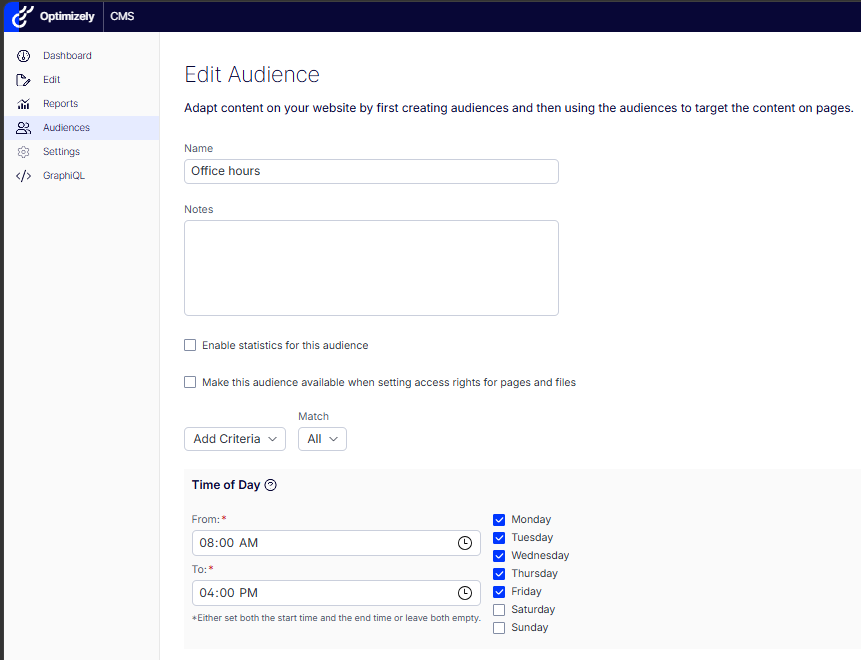 The built-in Time of Day criterion on an “Office hours” CMS audience: 08:00-16:00, Monday to Friday.
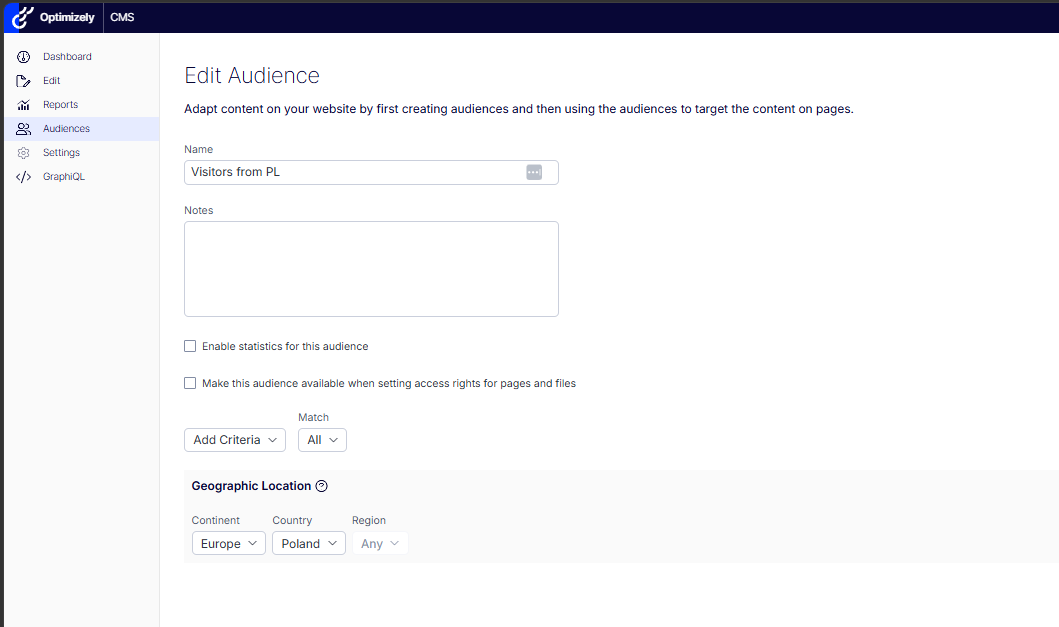 The built-in Geographic Location criterion on a “Visitors from PL” CMS audience: Europe / Poland.
The attribute pipeline: FX only knows what you tell it
The part-2 provider sent two attributes derived from the request: device from the User-Agent, location from geo headers. Part 3 grows it to five, and the growth is where the lessons are:
return new Dictionary<string, object?>
{
["device"] = ResolveDevice(request), // "mobile" | "tablet" | "desktop"
["location"] = ResolveLocation(context), // "PL", "SE", ... | "unknown"
["logged_in"] = context?.User.Identity?.IsAuthenticated == true, // a real bool
["cms_role"] = ResolveCmsRole(context?.User), // "admin" | "editor" | "none"
["consent"] = HasConsent(request) // a real bool, from a cookie
};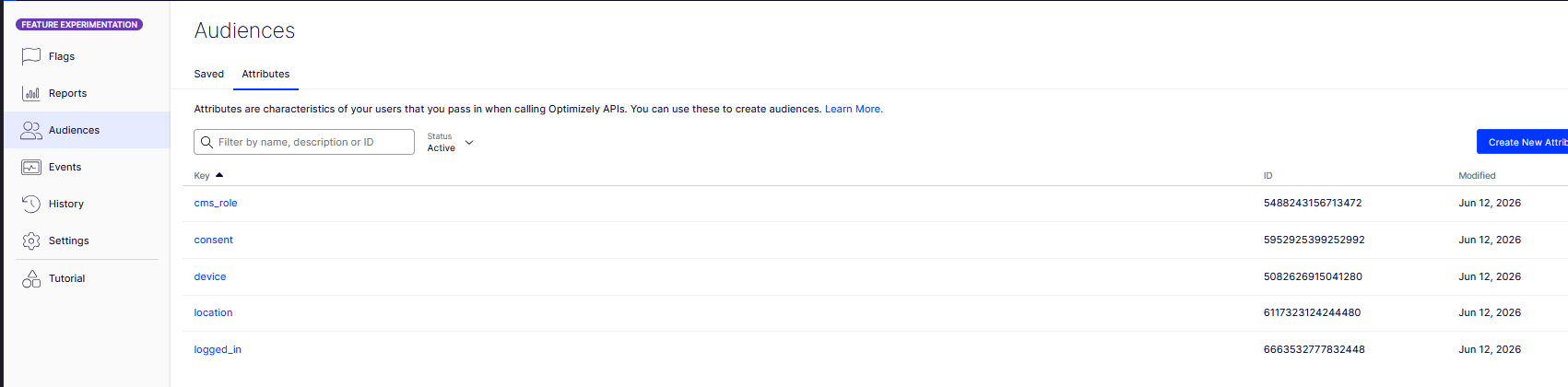 FX dashboard, Settings -> Audiences -> Attributes: the five registered keys (cms_role, consent, device, location, logged_in). These keys are the code-to-dashboard contract.
Three rules carried more weight than I expected when I wrote them down.
(Throughout this article, “the panel” means part 2’s instrument set. The demo page renders a variation pill carrying the served arm plus a data-rule attribute naming the rule that served it, and a Development-only diagnostics panel showing the visitor ID, the attribute dictionary and the SDK’s Decide reasons. Every measurement below reads off those two surfaces.)
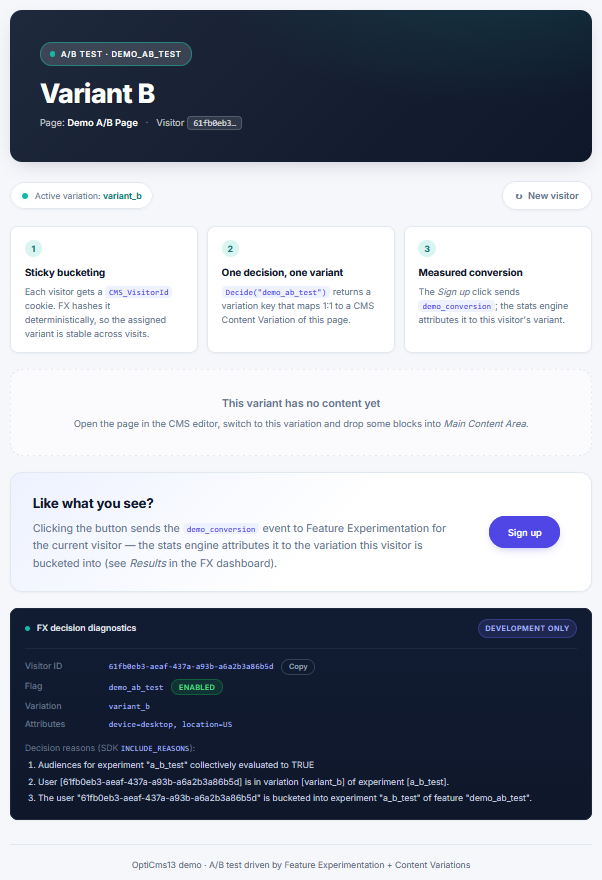 “The panel”: the variation pill above the Development-only FX decision diagnostics - visitor ID, served variation, the attribute dictionary, and the SDK INCLUDE_REASONS trace.
Types are the contract. Attributes are untyped in the dashboard. The value you send decides which comparisons can match. Send the string "true" against a boolean condition and the condition is skipped: evaluated to UNKNOWN, audience false, visitor falls through, nobody logs an error at default verbosity. The booleans above are real booleans for exactly that reason. (Sharp edge #3 has the measurement.)
Absent and false are different inputs. An anonymous visitor on the MVC head sends logged_in = false. If the headless head simply omitted the key, an audience targeting logged_in is false would match on one head and skip on the other. Same visitor, same flag, different arms, and you would hunt the bug in the hashing where it isn’t. The Next.js head therefore sends the constants its reality justifies: its visitors are, truthfully, never logged in.
One request, one context, attributes enter once. The decision service is request-scoped and builds the SDK user context a single time. The banner flag, the experiment and the conversion all agree on who the visitor is. Change an attribute mid-request and nothing happens. That is by design, and worth a comment in the code so nobody “fixes” it.
Geolocation: one header now feeds both engines
The hand-rolled four-header geo parser from part 2 is gone. CMS 13 ships native client geolocation: country from a single configured CDN header, no local IP database.
services.AddCmsClientGeolocation(o => o.LocationHeader = "CF-IPCountry");The same IClientGeolocationResolver now answers two callers: our FX location attribute and the built-in geographic criterion of CMS Audiences. One configuration line, two engines. That also means one spoofed header fools both at once. curl -H "CF-IPCountry: SE" and the panel reads location=SE. The part-2 caveat about attacker-supplied input didn’t go away. It doubled its blast radius. And a detail measured the hard way: the resolver wants an uppercase ISO code. PL resolves; pl resolves to nothing. Cloudflare sends uppercase, so production works. But any homegrown proxy that normalizes headers to lowercase turns your geographic targeting off, both engines’ worth of it, with no warning, no log line, no sound. The diagnostics panel reading location=unknown while the header is plainly there is the only tell.
The consent attribute is not an attribute. Or rather: it is targetable like any other, but its real job is a switch. Impression and conversion events carry the visitor ID and the attribute dictionary to Optimizely’s backend. That payload is precisely the thing a non-consenting visitor declined. So when consent is false, the service calls Decide with DISABLE_DECISION_EVENT and turns Track into a logged no-op. Flags keep working, because the datafile evaluation is local, but nothing leaves the building. Consent is not an audience attribute. It is an event-egress switch. (The demo toggles it with a cookie; a real implementation wires it to your CMP. And the conversion button now reports tracked: false instead of celebrating an event that never left. A demo that lies to you is worse than no demo.) One boundary disclosed rather than implied: the visitor-ID cookie itself is set, and bucketing happens, before any consent. This build treats the identifier as functional state and gates only what leaves the building. Your CMP, or your DPO, may read that line differently. That conversation belongs in your project rather than an SDK option.
One honest note before moving on: FX has no server-side bot filtering. A crawler’s User-Agent contains no “Mobi”, so every bot enters your experiment as a desktop visitor and dilutes whatever it touches. Either gate Decide on known-bot UAs or accept the noise knowingly.
Targeted Delivery: personalization without the dice
The plan was seductively simple: put a targeted rule above the everyone-else A/B test. Mobile gets the personalized arm, everyone else keeps experimenting. The dashboard said no, and the way it says no is the finding. The ruleset isn’t one sortable list. It’s three fixed sections whose headings literally narrate the evaluation order:
First, match experiment rule --> [1] a_b_test (A/B, audience: Non-mobile visitors)
Then, the following rules will be
evaluated for all visitors --> [2] mobile_delivery (deliver variant_a, 100%)
Then, for everyone else --> Off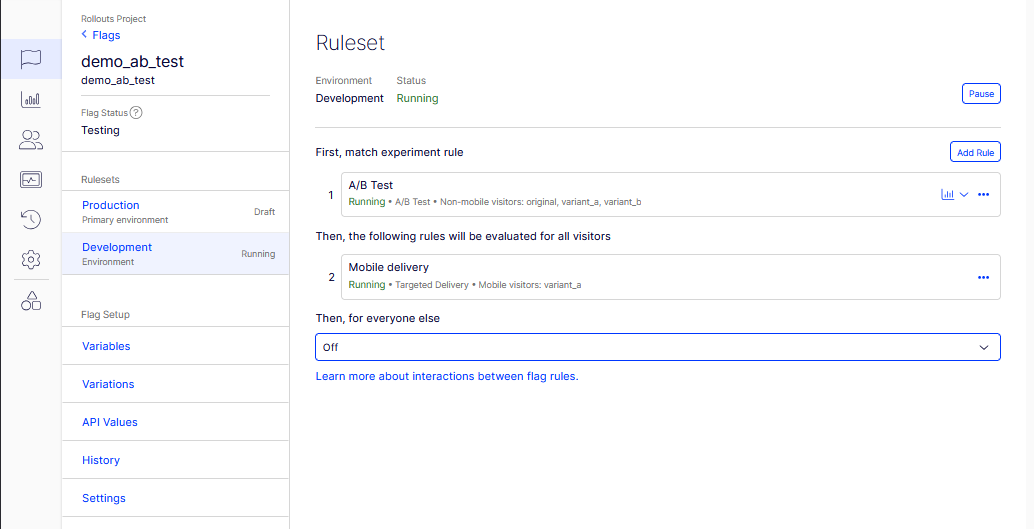 The ruleset’s three fixed sections: experiment first, then deliveries for all visitors, then everyone-else. There is no shared list to drag a delivery above an experiment.
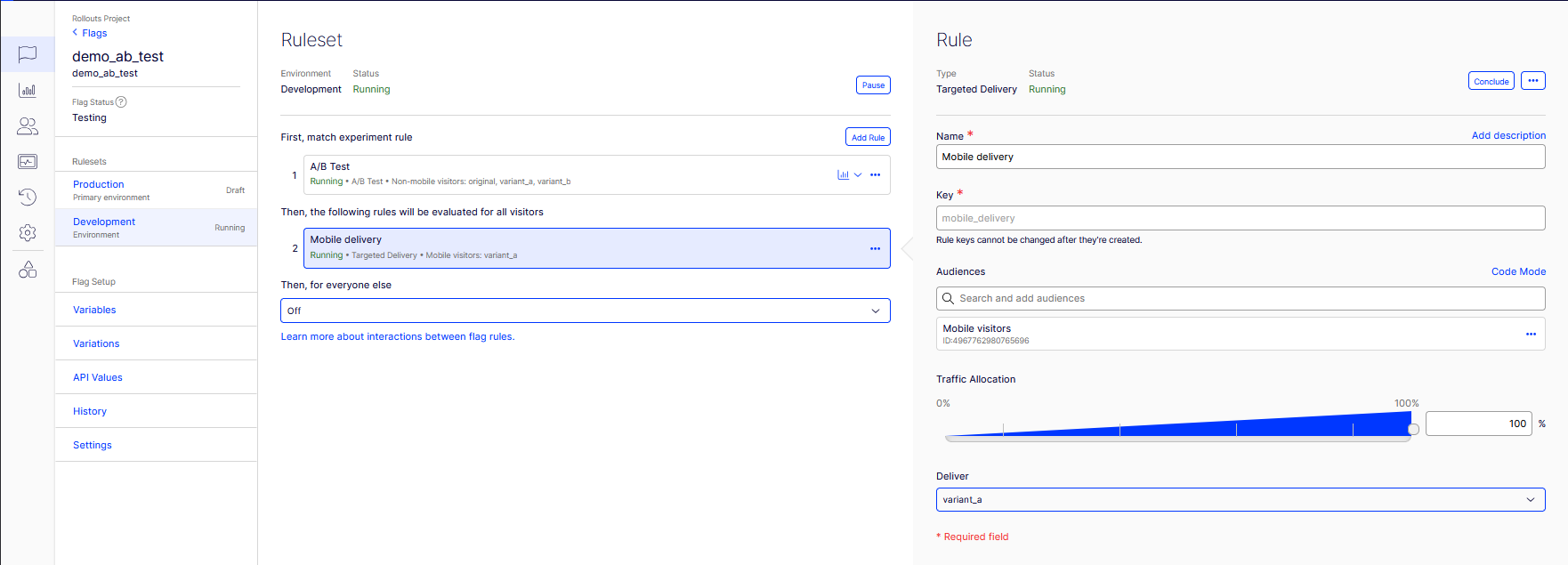 The mobile_delivery rule: Targeted Delivery, audience Mobile visitors, 100%, deliver variant_a.
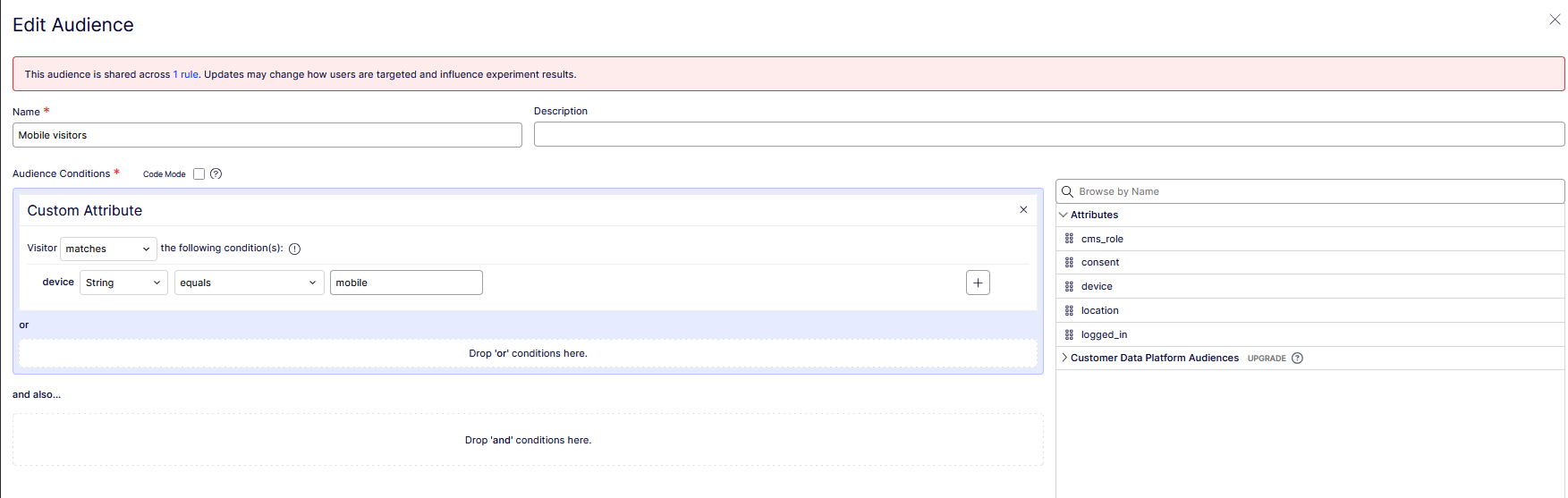 The Mobile visitors FX audience: device equals “mobile”, with all five attribute keys in the browser on the right.
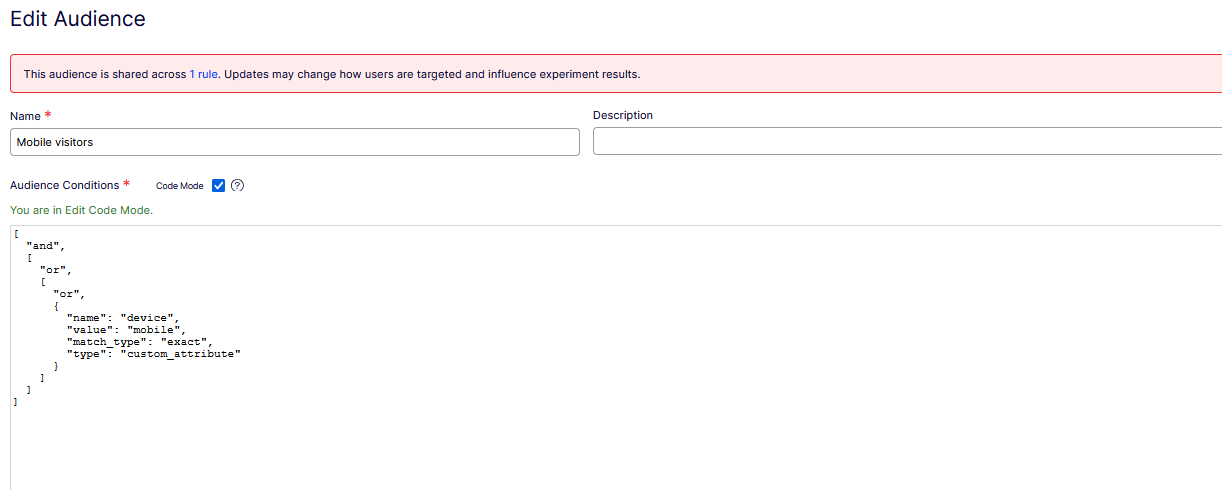 The same audience in Code Mode: match_type “exact”. The datafile the SDKs evaluate spells the field “match” (sharp edge #1, and the match_type-vs-match footnote).
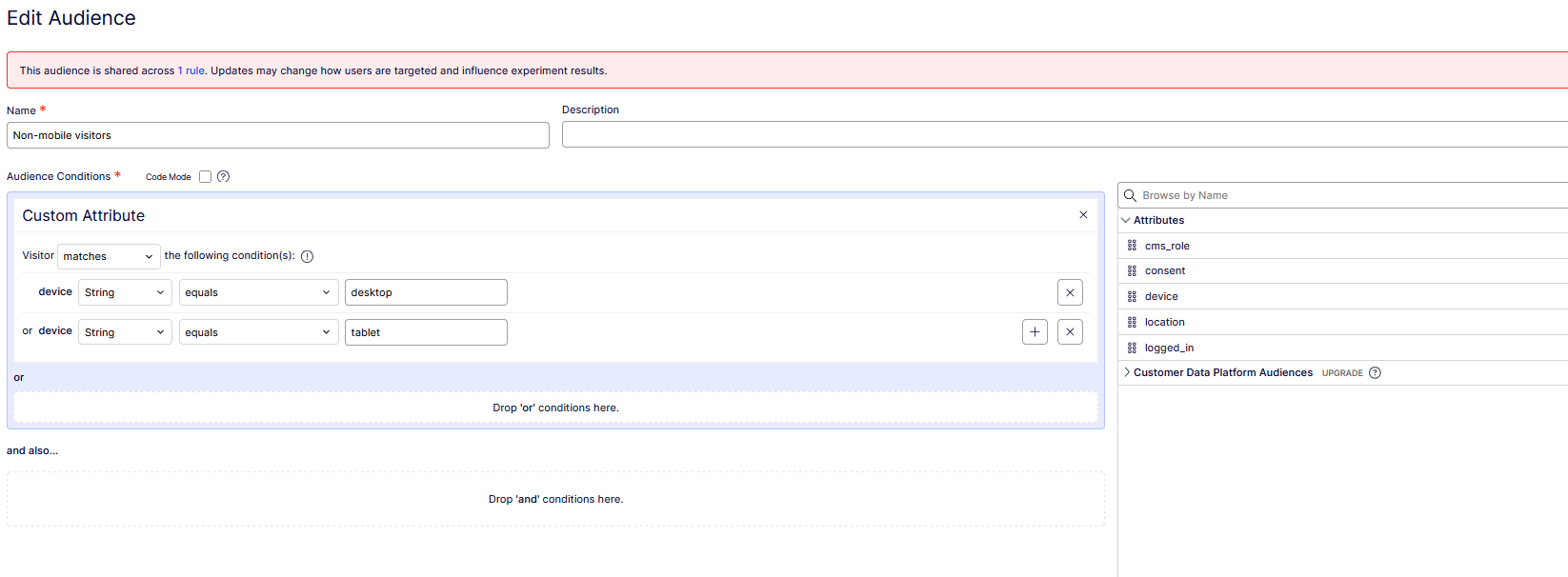 The Non-mobile visitors audience used to carve the experiment: a positive list, device equals desktop OR tablet, so an unknown device matches nothing and lands on master.
Experiments are evaluated before deliveries, always. The UI encodes the law in its page structure rather than enforcing it with an error. So carving mobile out of the experiment happens in the audience, not in rule order. The A/B rule’s audience changed from Everyone to Non-mobile visitors: a deliberately positive list (device = desktop OR tablet) rather than a negation. That way a visitor with a missing or mangled device attribute matches nothing and lands on master, which is the honest outcome for “we don’t know who this is”.
Two semantics from the docs that almost nobody quotes, both load-bearing:
- An experiment whose audience matches but whose traffic allocation misses rolls down to the next rule. A delivery in the same situation jumps straight to everyone-else, skipping any deliveries below it.
- Deliveries produce no Results page: “No decision events show up on the results page.” A delivery is deployment, not measurement. Our mobile visitors get their personalization and leave the experiment’s bookkeeping entirely. The A/B sample quietly becomes a desktop-and-tablet sample. Write that sentence in your analysis doc before someone asks why the experiment’s traffic dropped.
And one behavioral nuance that will eventually puzzle a stakeholder: bucketing is sticky, attributes are not. The same visitor who taps “Request desktop site” in mobile Chrome flips device mid-cookie, exits the delivery, and enters the experiment. Same visitor ID, different arm, both serves correct. Attribute-driven targeting re-evaluates every request. Only the hash is forever.
Configuration footnote from the audience builder: the dashboard’s Code Mode validates conditions with the key match_type, while the datafile the SDKs download spells the very same field match. Two serializations of one concept. Harmless until you copy a condition from the datafile into Code Mode and the validator rejects what the SDK just evaluated. The SDK’s own log line later in this article shows the match spelling in the wild.
Can both engines coexist on one page? Yes - at different layers, measurably
This is the part people actually google, so here is the layered setup, built and measured. FX picks the page version (mobile → variant_a via the delivery), and inside that version one block carries a CMS Audience (Mobile visitors (CMS), our DeviceCriterion). Two engines, two layers, same page.
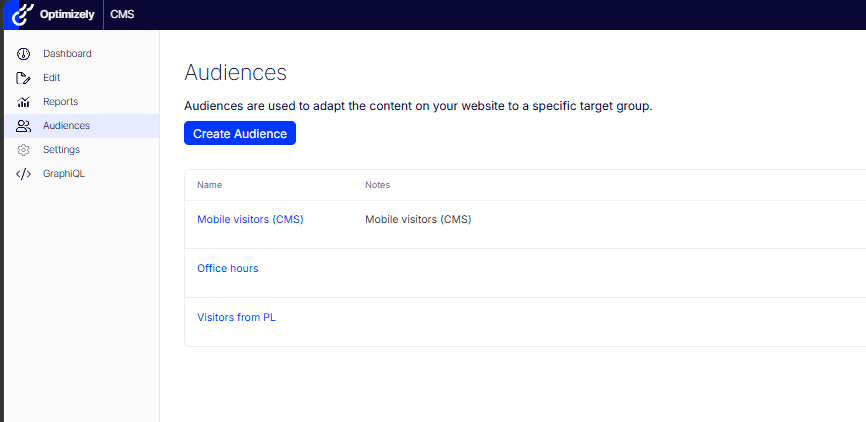 CMS Audiences admin: Mobile visitors (CMS), Office hours, Visitors from PL.
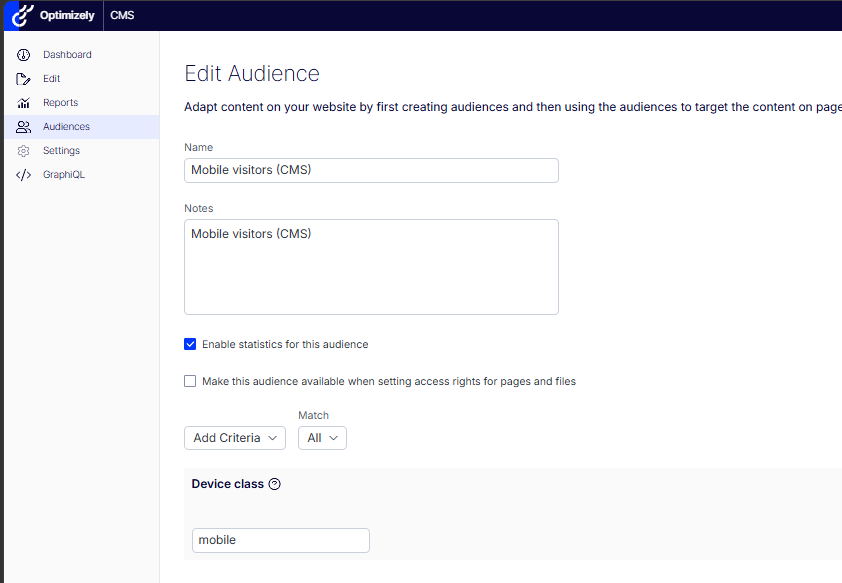 The Mobile visitors (CMS) audience on the custom Device class criterion (value “mobile”), statistics enabled.
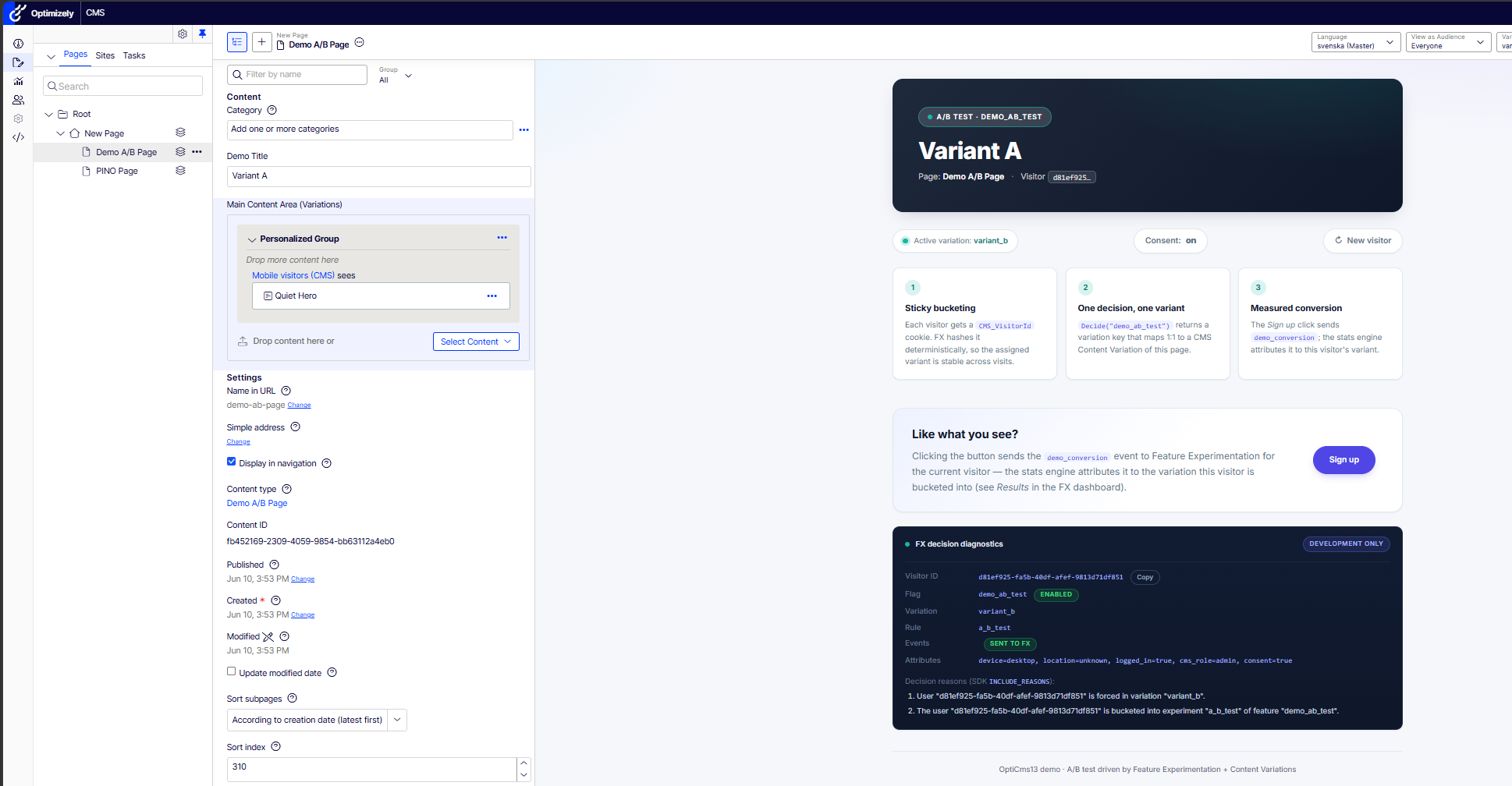 Assigning the audience to a content-area block inside variant_a in the CMS editor, with the rendered variant on the right.
The measurement needed care, because FX variation noise would drown the block signal. Take one visitor ID that desktop-buckets into variant_a through the experiment, then request the page twice: same visitor, same page version, only the User-Agent differs.
Probe (same visitor, same variant_a) | Rule that served it | Content area |
|---|---|---|
| Desktop | a_b_test | empty - block filtered out |
| Mobile | mobile_delivery | “Mobile Quiet Hero” renders |
Pure visitor-group effect, isolated from FX. The coexistence answer: no conflict, different layers. The FX decision happens in the controller before rendering. The CMS Audience filters content-area items during rendering. The pitfall isn’t a conflict, it’s unreachability: personalize a block for mobile in the master version and no one will ever see it, because under this ruleset mobile never receives master. The FX rule one layer up decides which content area exists at all.
There’s a sour bonus measurement. An earlier build of this demo, the one registered from decompiled internals instead of the documented AddVisitorGroupsMvc(), served that personalized block to the desktop probe too. Same content, same audiences, one missing rendering filter, zero errors. Keep that pair of runs. It’s the cleanest argument I own for “configure from the docs, not from the decompiler”.
What does Content Graph actually do with a personalized block?
The same page travels to the Next.js head through Optimizely Graph. The personalized item doesn’t:
variant_a --> MainContentArea: [] (the block the MVC head demonstrably renders)
original --> MainContentArea: []
control --> MinimalPage.HeroArea: [{ "Heading": "EN Heading" }] // non-personalized area expands fine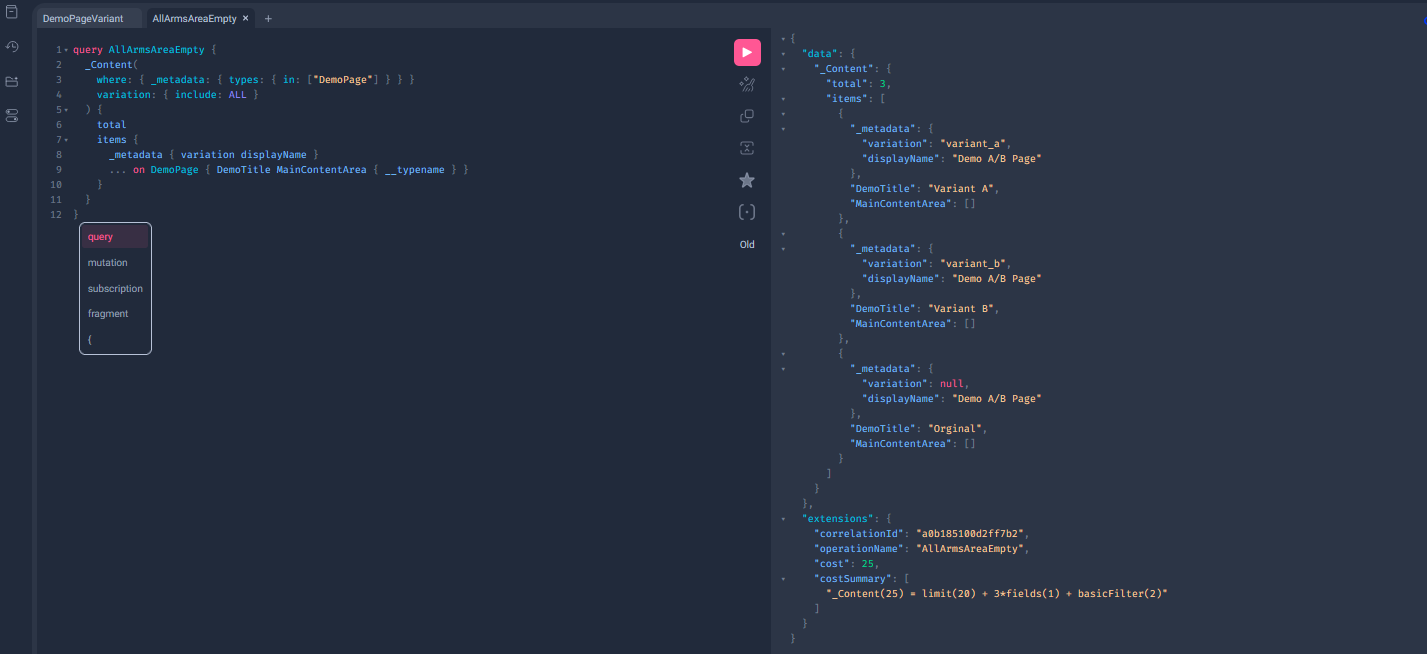 Optimizely Graph: all three DemoPage arms (variant_a, variant_b, master) are in the index with distinct DemoTitle, yet every MainContentArea is []. The page variation survives; the personalized content-area relation does not.
Not a leak. A void. The VG-personalized item vanishes from the index for every Graph consumer, including the mobile visitors who would have matched. No API error, no warning in the sync job, nothing for the front-end to even detect. The shape of the void is worth a second look: the block itself is still in the index - four QuietHeroBlock documents, each with its own identity and content - but the page’s content-area relation to it is gone. The explanation consistent with every measurement is that indexing evaluates the page without a visitor to personalize for, and an audience-gated item has no honest answer to “should this exist?”, so it doesn’t. Whatever the internals, the contract you can rely on is the measured one: personalization severs the composition, not the content. The docs say it without decoration: “audiences do not work on headless sites.” The measurement above is what that sentence costs in practice.
So what do you actually do when the roadmap says headless? There are three shapes, in order of preference. First, move that personalization up a layer to FX Audiences and Content Variations. That is this article’s whole thesis, and it needs nothing new. Second, take the CMS 13.1.0 Graph Conventions API and customize indexing so the head receives the items plus enough metadata to filter client-side. Workable, but now you own the audience semantics on every head. Third, stand up a membership endpoint on the CMS that the head consults per request. It works, and it is exactly the coordination code this series exists to avoid. There is no fourth option where the block just shows up.
The decision table
| You need… | Engine |
|---|---|
| The same personalization on every head, today and after the next re-platform | FX Audiences + Content Variations |
| Criteria that read CMS state - roles, visit history, time of day | CMS Audiences |
| Measurement: exposures, conversions, significance | FX (deliveries excluded - they don’t report) |
| Kill switch without a deploy | FX (latency = datafile propagation; measured at ~75 s here) |
| Fragment-level personalization, CMS-rendered site, no measurement need | CMS Audiences |
| Zero marginal license cost | CMS Audiences (in the CMS license; FX is usage-billed, though deliveries fire no impressions, only experiment bucketing does) |
| Per-request evaluation cost approaching zero | FX (pure in-memory function; VG criteria may do I/O per content-area item) |
| Ownership by content editors - instant, local, visual | CMS Audiences (VisitorGroupAdmins; no deploy, no datafile, changes land on publish) |
| Ownership by product managers and analysts | FX Audiences, with attribute-key discipline as the price: keys are a code-to-dashboard contract, and once created an attribute stays in the datafile permanently |
A word of architectural restraint: a personalized block inside an experiment variation multiplies your test matrix: arms × audiences × consent states. The demo does it to prove the layering. Production teams should default to one personalization axis per page, and budget QA explicitly before crossing them.
ODP deserves its one paragraph: when the attributes should come from customer data rather than the current request, Real-Time Segments for Feature Experimentation syncs ODP audiences into the same rule slots. Segments stay out of the datafile, qualification typically lands under thirty seconds, and Optimizely’s own docs concede that when you need 100% accuracy you should fall back to plain custom attributes. Different source, same predicate machinery. That’s the whole story here. This demo has no ODP account on purpose.
From prose to proof: the day the headless head went dark
Here is the embarrassing measurement first, because it earns the rest of the section. The moment the A/B rule’s audience changed from Everyone to Non-mobile visitors, the Next.js head, which part 2 proudly demonstrated holding a perfect 33/33/34, went one hundred percent dark:
default (master)      300  (100.00 %)
FAILED: "300 request(s) were served the master page (no FX decision) - check
that the rule is Running, Traffic Allocation is 100% and the SDK key matches
the rule's environment."
Rule running, allocation 100%, SDK key correct. The test’s own diagnostic, written by me in part 2, blames everything except the actual cause: the head’s decide() sent no attributes, so the visitor matched neither audience and fell through to everyone-else-off. No errors, green dashboards, a misleading failure message, and a head silently serving master to every visitor from the minute the audience shipped. Audiences don’t add a feature to your architecture. They add a requirement to every head you run.
The fix is a mirror: a buildAttributes() on the Next side that reproduces the .NET pipeline byte for byte. The parity contract lives in one file with a comment that says exactly that: if the heuristics drift, parity dies at the attribute layer while everyone debugs the hash. The contract itself fits in a table, which is how it should be reviewed:
| Attribute | The rule both heads obey |
|---|---|
device | Substring tests, case-insensitive: iPad/Tablet → tablet, else Mobi → mobile, else desktop |
location | Header path is strict: ^[A-Z]{2}$ and ≠ XX, no case folding (mirrors the measured CMS resolver); the Accept-Language fallback does fold case (pl-PL → PL) |
logged_in, cms_role | Real types, truthful constants on the auth-less head (false, "none"): absent and false are different inputs |
consent | bool.TryParse semantics: case-insensitive true, anything else false |
Upgrading the JS SDK to v6 along the way produced one trap worth its own line. v6 is explicit-opt-in across the board: polling config manager, logger, and ODP all opt-in. So is the event processor: omit createBatchEventProcessor() and decisions keep flowing while the SDK dispatches no events at all. Served-but-unmeasured, the exact failure shape this series keeps finding, now available at the initialization layer. (The same modularity quietly fixed an old log nag: no ODP manager, no “ODP is not integrated” warnings.)
Two Next.js-specific notes earned their scars. The SDK instance is cached on globalThis, the same trick Prisma clients use, because next dev’s Fast Refresh re-evaluates modules. A module-level singleton would leak a fresh polling manager and event processor on every save, and your datafile CDN would meet them all.
And one asymmetry to disclose rather than hide: the C# head flushes its event queue on shutdown because the DI container disposes the client (part 2’s contract). A Node process has no such container. The batch rides flushInterval, and what happens at the end of a process’s life depends entirely on what kind of life it had:
- Long-running Node (
next start, a container): safe. The queue drains on the interval, and a tail lost to a SIGTERM is a rounding error. - Serverless / edge: risky. The platform can freeze the instance the moment the response returns, and a consented conversion dies in the buffer as a zombie event.
- The fix where it matters: shrink the batch to the point of synchronicity, or
await client.close()before the invocation ends, and accept the latency as the price of the data.
Pretending the queue always drains would be exactly the kind of silence this series hunts.
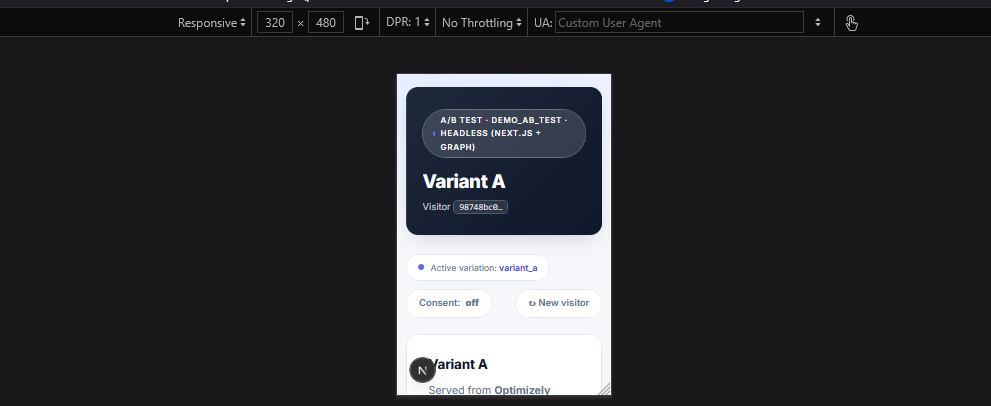 The Next.js headless head on a mobile viewport: the same FX decision serves variant_a via mobile_delivery, and the variation’s title arrives through Optimizely Graph - zero coordination with the MVC head.
Then the green numbers, all in one evening:
| Check | Result |
|---|---|
| Mobile, 60 fresh visitors (hard assertion: a delivery rolls no dice) | 60/60 variant_a via mobile_delivery |
| Desktop distribution, n = 300, against the Next head | 103 / 105 / 92, χ² = 0.985 (critical 13.816 at α = 0.001, df = 2) |
| Same regression against the MVC head | 99 / 109 / 92, χ² = 1.465 |
| Cross-head parity: 4 fixed + 6 random visitors × desktop and mobile | arm AND rule identical on both heads, 20/20 pairs |
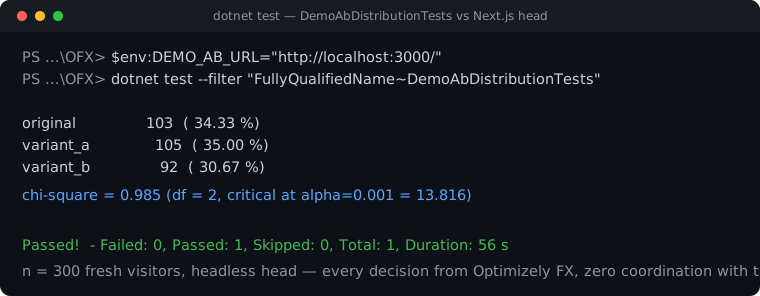 The desktop chi-square run against the headless Next.js head: 103 / 105 / 92 over n = 300, χ² = 0.985 - well under the 13.816 critical value. Every decision came from Optimizely FX in the Node SDK, zero coordination with the MVC head.
The parity test asserts the rule key, not just the arm. “mobile got variant_a” and “mobile happened to be bucketed into variant_a” are different claims, and only data-rule in the markup separates them. MurmurHash plus deterministic audience evaluation. Still zero coordination code.
The arithmetic deserves to be shown once, not just asserted. For the MVC regression (99 / 109 / 92 over n = 300, expected ≈ 100 per arm):
χ² = (99−100)²/100 + (109−100)²/100 + (92−100)²/100
   = 0.01 + 0.81 + 0.64 ≈ 1.46
(The suite reports 1.465 because it tests against the configured 33.33/33.33/33.34 rather than exact thirds.) With df = k − 1 = 2 and α = 0.001, the critical value is 13.816, and 1.465 ≪ 13.816, so the null hypothesis (“the split matches the configuration”) survives comfortably. In words: after carving the mobile segment out with an audience, the hash shows no distributional anomaly in what remains. The same computation on the Next head’s 103 / 105 / 92 gives 0.985, comfortably inside the spread a fair split throws at n = 300.
Threats to validity, disclosed as ever: the chi-square run verifies the bucketing distribution, not content delivery (part 2’s caveat stands). The mobile check is exhaustive rather than statistical, because a 100% delivery is deterministic: a single counterexample falsifies it, no α required. And every test here runs without a consent cookie, which after the egress gate means the suite sends zero impressions to FX. Three hundred requests of load testing used to pollute Results. Now the same suite is invisible to it. That started as a privacy control and turned out to be test hygiene.
QA: three override levels, three owners
“How does QA see the variant for a segment they don’t belong to?” That is the question audiences force on every test plan. Three answers, escalating by who owns them:
- New visitor (the cookie-reset button, part 2): owned by anyone with a browser. Re-rolls the dice but can’t cross an audience boundary. The button also demonstrates something subtler: rotating the visitor ID re-buckets every experiment, leaves a delivery unmoved (its audience is deterministic in the attributes, not the ID), and the CMS Audience doesn’t even notice; its criteria never saw your visitor ID in the first place. One page, three different notions of who “you” are. QA plans that conflate them chase ghosts.
- Allowlist (dashboard, per rule, up to fifty IDs): owned by the marketer, pins a visitor ID to an arm. Measured here: an allowlisted ID came back
variant_bwith the SDK reason “is forced in variation”. Caveat: allowlisted traffic still fires impressions, so your QA session pollutes Results. ?fx_force=demo_ab_test:variant_b(this part): owned by the developer, a Development-only query parameter mapped to the SDK’s forced-decision API. It bypasses audiences and allocation (forced mobile, forced desktop, doesn’t matter), and, deliberately unlike the allowlist, a forced request also suppresses its decision events. QA that leaves no fingerprints on the data it’s there to protect. The whole mechanism is one small source behind one small interface, so the SDK types stay where part 2 put them:
var forced = forcedDecisionSource.GetForcedDecisions(); // [] outside Development
foreach (var (flagKey, variationKey) in forced)
{
userContext.SetForcedDecision(
new OptimizelyDecisionContext(flagKey),
new OptimizelyForcedDecision(variationKey));
}
_eventsAllowed &= forced.Count == 0; // QA traffic never reaches Results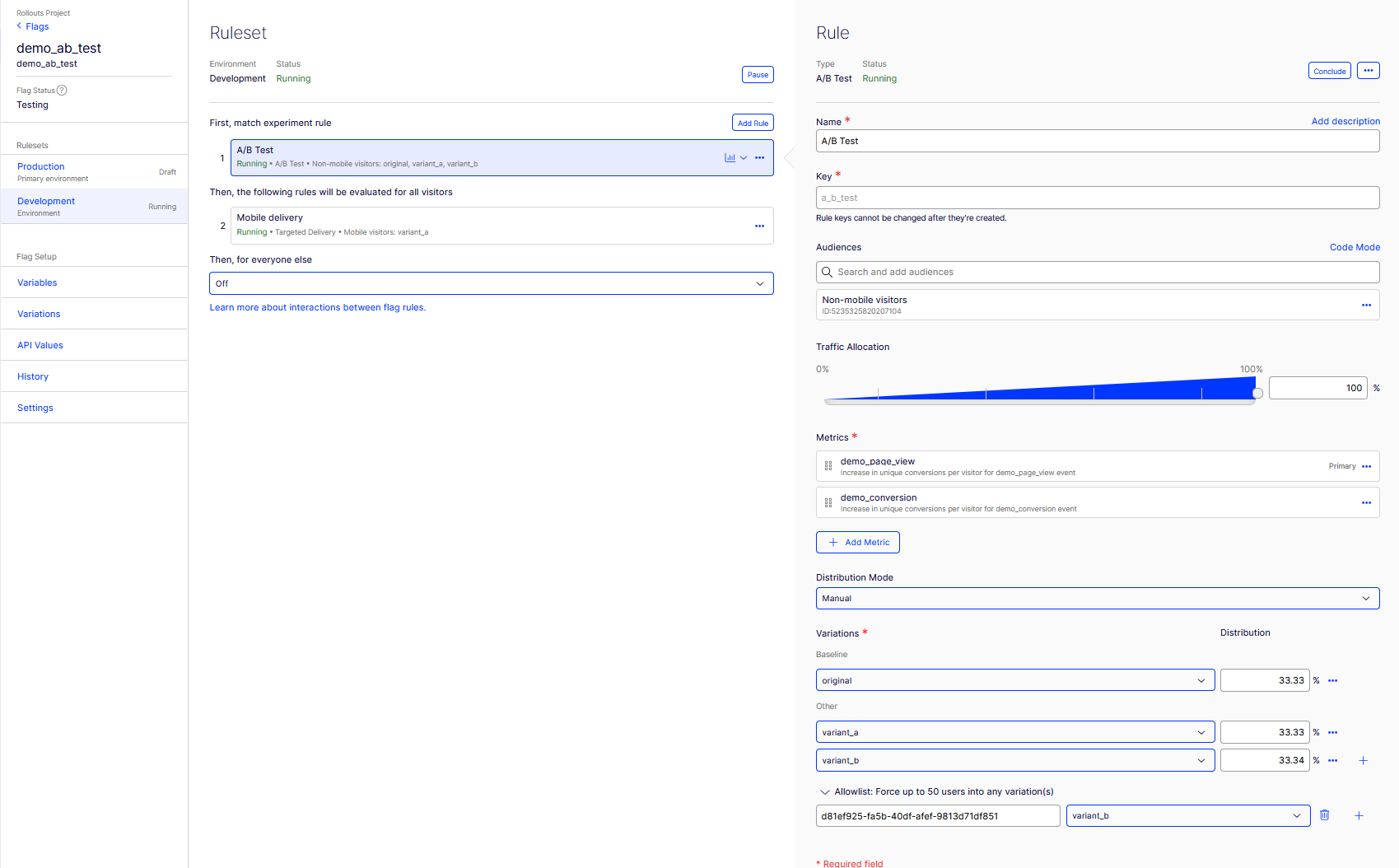 The A/B Test rule: audience Non-mobile visitors, 100%, the 33.33 / 33.33 / 33.34 split, and the allowlist pinning a QA visitor ID to variant_b.
While we’re holding the decide call open, the full option set gets a reference table (part 2 named these in prose):
| Decide option | What it does | Where this series uses it |
|---|---|---|
INCLUDE_REASONS | Returns the evaluation trace - which rule matched, why audiences failed | Every call; feeds the diagnostics panel |
DISABLE_DECISION_EVENT | Evaluates without sending an impression | No-consent requests; forced QA requests |
ENABLED_FLAGS_ONLY | Filters DecideAll to enabled flags | - |
IGNORE_USER_PROFILE_SERVICE | Skips UPS stickiness for this call | - (this demo runs without UPS) |
EXCLUDE_VARIABLES | Omits variable payloads for cheaper decisions | - |
The CMS side has its own counterpart, View as Audience in the editor, with one boundary note: it previews visitor groups, not FX arms, and the docs scope it to CMS-rendered sites only. Pair the two in your test plan. Neither substitutes for the other.
Forced decisions are not persistent. They clear with the user context, which in this architecture means they last exactly one request. That’s not a limitation. Per-request is the only scope that can’t leak into someone’s real session.
Runbook: “the page always serves master”, audience edition
Part 2 ended with a checklist for the all-master symptom. Audiences roughly double it. The developer’s mental map first: data-rule on the pill is the fork in the road.
[Pill says master]
  |
  +-- data-rule is EMPTY              --> no decision at all:
  |                                       SDK key / datafile / flag off  (part 2's checklist)
  |
  +-- data-rule = default-rollout-... --> "everyone else" fired: NO audience matched
  |       |
  |       +-- Attributes wrong/missing --> context pipeline gap
  |       |                                (the dark-head failure: a head sending nothing)
  |       +-- Attributes correct        --> condition-side defect: whitespace, case, type
  |                                          (open the audience in Code Mode; quotes show it)
  |
  +-- data-rule = a real rule, arm = original --> working as designed:
                                                  control arm serves master via fallback
And the full ordered checklist, where each step assumes the previous ones passed:
| # | Check | Where the truth shows |
|---|---|---|
| 1 | SDK key matches the rule’s environment; ruleset Running; variation toggles ON | Part 2’s checklist (dashboard) |
| 2 | The decision reached a rule at all | data-rule on the pill: default-rollout-… means everyone-else fired |
| 3 | The attributes you think you send are the attributes you send | Diagnostics panel, Attributes row - wrong name, wrong case, wrong type, missing key are all visible here |
| 4 | The audience condition matches those attributes byte-for-byte | Reasons: “collectively evaluated to FALSE” while the panel shows the right value ⇒ condition-side defect (whitespace, case, type); open the audience in Code Mode, quotes make it visible |
| 5 | Type mismatches | SDK log (not reasons): “evaluated to UNKNOWN because a value of type … was passed” - requires the part-2 logger |
| 6 | The head sends attributes AT ALL | The dark-head failure: decide() without attributes matches nothing, and the test diagnostics will blame the rule |
| 7 | Datafile freshness | Audience edits propagate on the polling interval like every other change |
| 8 | (CMS side) the personalized block’s layer is reachable | A block personalized in a version the visitor never receives is invisible by construction |
| 9 | (CMS side) the rendering layer is registered | Audiences screen working ≠ filter running - AddVisitorGroupsMvc(), then the startup self-check proves it |
Sharp edges, part 3: ranked by blood actually drawn
Same tradition, same ordering rule. Every one of these happened on this instance, this week.
1. A trailing space in an audience condition. The audience said device = "mobile ". The builder keeps whatever the clipboard delivered, and exact-match fields are not trimmed. Exact match means exact: every mobile visitor silently fell through two rules to master while every dashboard stayed green. The only witness was the diagnostics panel: attributes showed device=mobile, reasons showed Audiences for rule "mobile_delivery" collectively evaluated to FALSE, and the contradiction between those two lines is the diagnosis. Code Mode confirms it fastest. JSON quotes make whitespace visible. Cost: the better part of an evening, and it produced this list’s ordering.
2. One [OutputCache] attribute defeats both engines and privacy at once. Swap the demo’s no-store guard for platform output caching, and the measurement reads like an incident report: a desktop visitor received the mobile visitor’s page from cache: wrong arm, wrong personalization, and the other person’s visitor ID rendered in the panel, Age: 0 confirming the hit. The CMS-aware output cache has been gone since the CMS 12 rewrite, and CMS 13 still gives the platform layer nothing that knows your pages are personal (verified: no output-cache type exists anywhere in the 13.1.0 assemblies). The fix is not a smarter cache key. It is classifying pages: personalized means no-store, full stop. (The CDN analog is “ignore cookies in the cache key”, which produces the same leak at planetary scale.)
3. Type mismatch evaluates to UNKNOWN, and only the logger says so. Send device as a boolean and INCLUDE_REASONS reports a flat “collectively evaluated to FALSE”. The why lives one layer down, in the SDK log the part-2 adapter made visible: Audience condition {"match":"exact","name":"device","value":"mobile"} evaluated to UNKNOWN because a value of type "Boolean" was passed. Wire the logger on day one was part 2’s advice. This is the day it pays. (Note the "match" spelling: the datafile serialization, not the dashboard’s match_type.)
4. A missing attribute is quieter than a wrong one. Drop device from the dictionary and the fall-through looks identical. But this time there is no WARN anywhere, and the SDK mentions missing attributes only at debug verbosity. Absent isn’t false, and absent doesn’t log. The gradient of silence: wrong type warns (if you wired logs), wrong name says nothing, missing says nothing.
5. Case sensitivity, now in three places. Part 2 had the case-sensitive VariationKey. Part 3 adds attribute names (Device ≠ device), attribute values (Mobile ≠ mobile; our custom criterion deliberately Trim+lowercases editor input as a courtesy FX won’t extend), and the geo header’s value (pl resolves to nothing). That last one is also the closing argument for the unification: part 2’s hand-rolled parser folded case and would have accepted pl. The native resolver doesn’t. Two readers of one header with different tolerances is exactly the divergence class that breaks cross-engine and cross-head consistency: one resolver on the CMS, one written-down contract for the second head.
6. A personalized item doesn’t leak to Graph: it ceases to exist. The coexistence section holds the measurement. The dangerous half is that nothing tells you: the sync succeeds, the schema is fine, the array is just empty. If your roadmap says “headless next year”, every CMS Audience you ship today is a block that will silently vanish in the migration.
7. One header steers two engines. AddCmsClientGeolocation is genuinely elegant. And it concentrates trust in a single header that, exposed without an edge to strip client values, both engines will believe. The part-2 caveat, squared.
8. The datafile is still the clock. Editing an audience is a datafile change like any other. This instance picked the fix from edge #1 up in about 75 seconds on the default polling. Not a repeat of part 2’s lifecycle section. Just a reminder that audience edits ride the same train, and so does your kill switch.
FAQ - the questions as people actually type them
Can I use Visitor Groups / CMS Audiences with a headless frontend? No. Evaluation needs the CMS runtime, and the measurement here is blunter than the docs: a personalized content-area item isn’t filtered for Graph consumers. It is absent from the index entirely. Personalize whole page versions with FX Audiences instead. They evaluate in any SDK.
Targeted delivery or A/B test: which one do I want? Deliveries deploy, experiments measure. A delivery produces no Results page at all, so the question is really “do I need to learn anything from this traffic?” If yes, experiment; if you already know and just want control and ramp, delivery.
Why does my FX audience never match? In observed order of likelihood: a stray character in the condition value, the wrong value case, the wrong attribute-name case, the wrong value type, the attribute not sent at all. The runbook above walks the diagnostics. The short version: the panel shows what you sent, and the SDK log shows what the evaluator thought of it.
Can a delivery run above an experiment? No. The ruleset evaluates experiments first, and the UI encodes that as fixed sections rather than a sortable list. Carve segments out of an experiment with audiences, not with rule order.
Do I need ODP to use audiences? No. Everything in this article runs on request-derived attributes. ODP (Real-Time Segments) is the path when targeting needs customer data (past purchases, lifecycle stage) rather than facts about the current request.
How fast is the kill switch? One datafile propagation. This instance picked up an audience edit in ~75 seconds on default polling. The guarantee is your polling interval (or webhook latency), not the dashboard click.
Does QA and test traffic pollute my results? Dashboard allowlists do: they fire impressions like any decision. This build’s ?fx_force deliberately doesn’t, and the consent gate has a pleasant side effect: the entire automated suite (hundreds of requests per run) sends zero events, because test traffic never carries a consent cookie.
The take
The model that survives all of the above is short enough to memorize. The CMS owns what: versioned, publishable content variations, plus fragment-level personalization wherever the CMS itself renders. FX rules own who and whether: deterministic assignment, deliveries for rollout, experiments for measurement. Audiences, both kinds, own for whom, and the kind you pick decides where the personalization can exist at all. CMS Audiences see everything and travel nowhere. FX Audiences see only what you send and run everywhere you do.
For the business reader who skipped to the end: the mobile personalization in this demo shipped without a deploy, measured itself before an audience of three hundred synthetic visitors, survived a re-platform to a second rendering stack with zero integration code, and can be killed from a dashboard in about the time it takes to refresh a datafile. The block-level personalization shipped too. And it stopped at the CMS’s edge, invisible to the headless head, unmeasured by anything but page-view counters. Both behaviors are by design. The architecture decision is choosing which design your roadmap can live with.
The fragile parts haven’t changed character since part 2: every failure in this article degraded to “someone quietly sees master” or “someone quietly sees too much”, and not one of them threw. The integration is still strings and dictionaries. The engineering is still making the silence loud: a diagnostics panel, an SDK logger, a startup self-check, and tests that assert the rule, not just the arm.
Quiet hero, part 3: now it knows who you are. Still quiet - that’s still the problem to engineer around.
Glossary
| Term | In one sentence |
|---|---|
| Chi-square goodness-of-fit test | Tests whether observed arm counts are consistent with the configured split; χ² = Σ (observed − expected)² / expected. |
| Degrees of freedom | Category counts free to vary; k arms give df = k − 1, so our three arms test at df = 2. |
| Significance level α | The false-alarm rate the test tolerates; this series uses α = 0.001 so a healthy split almost never red-flags live. |
| Critical value | The rejection threshold for the statistic - 13.816 for df = 2 at α = 0.001. |
| Sampling error | Per-arm share fluctuates by ≈ √(p(1−p)/n) - about 2.7 percentage points at n = 300, p = ⅓. |
| MurmurHash | The deterministic hash every FX SDK applies to visitor ID + experiment; the reason parity needs no coordination. |
| Pure function | Same input, same output, no side effects - FX audience evaluation in one phrase. |
| Predicate | A boolean-valued function; both audience kinds are predicates over different inputs. |
| Eventual consistency | Distributed state converges after a delay - the datafile (~75 s observed) and the Graph index both live here. |
| Targeted delivery | A rule serving one variation to an audience; deployment, not measurement - no Results page. |
| Datafile | Configuration-as-data: the JSON snapshot of flags, rules and audiences every SDK evaluates locally. |
| Backend for Frontend | The server-side layer that keeps SDK and Graph keys out of the browser on the headless head. |
| Defense in depth | Layered safeguards - consent gate, no-store, antiforgery, origin checks - none trusted alone. |
| Allowlist | A per-rule list (up to fifty user IDs) pinning specific visitors to specific arms; fires impressions like normal decisions. |
| Forced decision | An SDK-level override bypassing audiences and allocation; not persistent - it lives and dies with the user context. |
Further reading
- Create audiences (CMS 13) · Personalize content with audiences
- CMS 13 breaking changes - the
AddVisitorGroupsMvc().AddVisitorGroupsUI()registration · Install CMS 13 - Interactions between flag rules - experiments before deliveries; roll-down vs jump
- Run flag deliveries · Define attributes
- Forced decision methods (C#)
- Upgrade the JavaScript SDK from v5 to v6 - the explicit
eventProcessor - Real-Time Segments for Feature Experimentation - the ODP path
- Part 2: Giving the Quiet Hero a Stats Engine - the integration contract, the 33/33/34 proof, and the two-head setup this part builds on.